
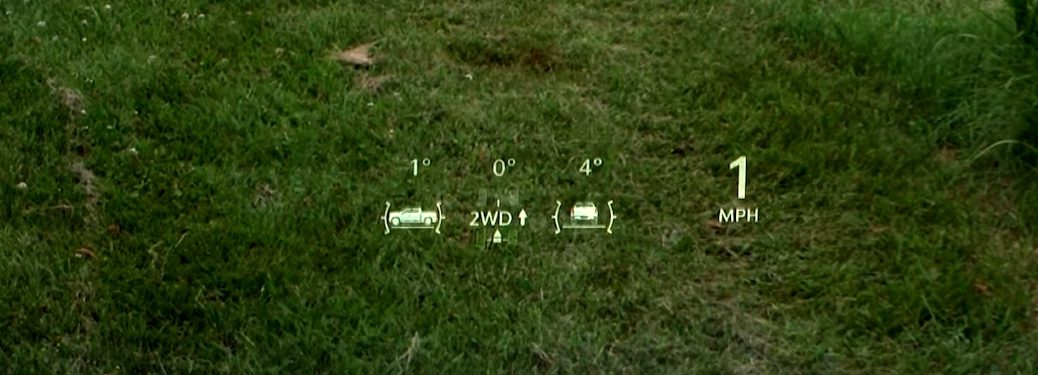
How to Use the Head-Up Display In the Chevy Silverado
Your Chevy Silverado comes with all sorts of high tech features, making it a blast to drive and a highly capable pickup. One of our favorite features is the head-up display. Below is a quick video covering everything you need to know about it.
If you’d like to adjust the display, here are a few tips:
- Press the HUD button to the left of the steering wheel to move the display up or down
- Press the INFO button right next to it to have the display show different vehicle info
- Press the button to the right of INFO to increase brightness or dim the display
- If going off-road, you can choose the Off-Road View. This will give you information on the pitch and steering angle, among other things, to help you safely traverse any terrain.
Find more tips and tricks here
Like!! I blog quite often and I genuinely thank you for your information. The article has truly peaked my interest.
These are actually great ideas in concerning blogging.
I learn something new and challenging on blogs I stumbleupon everyday.
I always spent my half an hour to read this web site’s articles or reviews daily along with a mug of coffee.
These are actually great ideas in concerning blogging.
Hey There. I found your weblog using msn. This is a very neatly written article.
I’ll make sure to bookmark it and return to read more of your useful info.
Thanks for the post. I will definitely comeback.
Undeniably believe that which you said. Your favorite justification appeared to be on the internet the simplest thing to be
aware of. I say to you, I certainly get annoyed
while people consider worries that they plainly do not know about.
You managed to hit the nail upon the top as well as defined out the whole thing without having side-effects ,
people could take a signal. Will likely be back to get more.
Thanks
I loved as much as you’ll receive carried out right here.
The sketch is attractive, your authored subject matter stylish.
nonetheless, you command get bought an nervousness over that you wish be delivering the following.
unwell unquestionably come more formerly again as exactly the same nearly very often inside case you shield this hike.
I’ve been browsing online more than three hours today, yet I never found any interesting article
like yours. It’s pretty worth enough for me. In my view, if all webmasters and bloggers made
good content as you did, the net will be much more useful than ever
before.
Every weekend i used to pay a visit this site, for the reason that i want enjoyment,
as this this website conations genuinely good funny
information too.
I simply want to mention I am new to weblog and seriously liked your blog. More than likely I’m planning to bookmark your site . You really have terrific well written articles. Kudos for revealing your blog site.
Would certainly you be interested in exchanging links?
Heya i’m for the first time here. I found this board and I to find It truly helpful & it helped me out a lot. I hope to provide something back and aid others such as you helped me.
I?d have to contact you here. Which is not something I generally do! I appreciate reviewing a message that will make people think. Likewise, thanks for allowing me to comment!
Howdy! Do you use Twitter? I’d like to follow you if that would be ok. I’m definitely enjoying your blog and look forward to new updates.
Just what’s Occurring we’m a new comer to this, I ran across this I’ve found It completely beneficial and possesses helped me away loads. I am hoping to be able to lead & help some other users such as it’s aided me. Great career.
Oh my benefits! an amazing article man. Thanks Nevertheless I am experiencing problem with ur rss. Don?t know why Incapable to register for it. Is there any person getting similar rss problem? Anybody who knows kindly respond. Thnkx
Your location is valueble for me. Thanks !?
I?m pleased, I have to say. Really rarely do I run into a blog site that?s both enlightening and entertaining, as well as let me inform you, you have struck the nail on the head. Your idea is impressive; the problem is something that not nearly enough individuals are talking intelligently around. I am very delighted that I stumbled across this in my look for something connecting to this.
You must take part in a contest for among the very best blogs online. I will suggest this website!
You must participate in a contest for among the very best blog sites on the internet. I will advise this website!
Great Site! I wanted to ask if I could quote a portion of your posts and use a handful of items for a school assignment. Please let me know whether or not that would be fine. Thanks
I am frequently to blog writing as well as i really value your material. The short article has actually peaks my interest. I am mosting likely to bookmark your website and also keep checking for brand-new details.
Nice message. I discover something more tough on different blog sites day-to-day. It will certainly constantly be boosting to read web content from various other authors and also practice a something from their store. I?d favor to use some with the content on my blog site whether you don?t mind. Natually I?ll provide you a link on your internet blog. Thanks for sharing.
It?s tough to discover experienced individuals on this subject, however you sound like you understand what you?re talking about! Many thanks
There are some fascinating points in this article but I don?t recognize if I see every one of them center to heart. There is some legitimacy but I will certainly hold opinion until I consider it further. Excellent write-up, many thanks as well as we desire extra! Added to FeedBurner also
Youre so great! I do not suppose Ive read anything such as this prior to. So good to locate someone with some original thoughts on this subject. realy thank you for beginning this up. this internet site is something that is needed online, someone with a little originality. valuable task for bringing something new to the web!
Pretty! This was an extremely wonderful article. Many thanks for providing this info.
The following time I read a blog site, I really hope that it doesn’t disappoint me as long as this one. I suggest, I know it was my selection to check out, however I really assumed youd have something interesting to say. All I hear is a number of grumbling concerning something that you might repair if you werent also busy seeking attention.
When I originally commented I clicked the -Alert me when new remarks are included- checkbox as well as now each time a comment is added I get 4 emails with the exact same comment. Is there any way you can eliminate me from that solution? Thanks!
A fascinating discussion is worth remark. I believe that you need to create a lot more on this topic, it may not be a frowned on topic however generally individuals are not nearly enough to talk on such topics. To the next. Cheers
Would you be fascinated in exchanging links?
Can I just claim what an alleviation to find somebody that actually recognizes what theyre speaking about on the net. You absolutely recognize how to bring a concern to light as well as make it essential. Even more individuals require to read this and also understand this side of the story. I cant think youre not much more popular since you most definitely have the present.
You made some respectable points there. I searched the web for the problem and found most individuals will go along with with your website.
I really like your writing style, fantastic info , appreciate it for putting up : D.
very wonderful message, i absolutely like this internet site, keep it
I am often to blogging and also i truly value your material. The write-up has really peaks my interest. I am mosting likely to bookmark your website as well as keep checking for new info.
An impressive share, I just offered this onto a colleague who was doing a little evaluation on this. And also he as a matter of fact purchased me breakfast due to the fact that I located it for him. smile. So let me reword that: Thnx for the treat! But yeah Thnkx for spending the time to discuss this, I really feel highly regarding it and also enjoy finding out more on this subject. When possible, as you come to be competence, would certainly you mind upgrading your blog site with more information? It is very valuable for me. Huge thumb up for this blog post!
Spot on with this write-up, I truly assume this website requires far more factor to consider. I?ll possibly be once more to read a lot more, thanks for that info.
There is visibly a bundle to learn about this. I think you made sure great points in attributes also.
You need to take part in a contest for among the very best blogs online. I will certainly advise this site!
Your area is valueble for me. Many thanks !?
After research study a few of the post on your internet site now, and I really like your method of blog writing. I bookmarked it to my book mark internet site checklist and also will be checking back soon. Pls check out my website too as well as let me recognize what you believe.
You must participate in a contest for one of the best blogs on the web. I will recommend this website!
An excellent share, I simply provided this onto an associate that was doing a little analysis on this. And he as a matter of fact acquired me breakfast because I located it for him. smile. So let me reword that: Thnx for the reward! Yet yeah Thnkx for spending the time to review this, I feel strongly concerning it and also enjoy finding out more on this topic. Ideally, as you come to be experience, would you mind upgrading your blog site with more details? It is highly handy for me. Large thumb up for this article!
After research a few of the blog posts on your internet site currently, and I genuinely like your way of blogging. I bookmarked it to my book marking site listing and will be inspecting back quickly. Pls have a look at my web site too as well as let me know what you assume.
I am typically to blogging as well as i truly appreciate your web content. The article has really peaks my passion. I am going to bookmark your website as well as maintain looking for new details.
Great info. Lucky me I ran across your website by accident (stumbleupon). I’ve book marked it for later!
I was recommended this blog by my cousin. I am not sure whether this post is written by him as no one
else know such detailed about my difficulty.
You are wonderful! Thanks!
really good article, i definitely love this site, keep on it
You really make it appear really easy with your presentation but I find this matter to be actually one thing that I believe I might never understand.
It seems too complicated and extremely broad for me.
I am looking ahead on your next publish, I’ll try to
get the hang of it!
This is the ideal blog site for any individual who intends to learn about this topic. You recognize so much its almost tough to argue with you (not that I actually would want?HaHa). You definitely put a new spin on a topic thats been covered for several years. Fantastic stuff, simply wonderful!
Today, I went to the beachfront with my children. I found a sea
shell and gave it to my 4 year old daughter and said “You can hear the ocean if you put this to your ear.” She placed the shell to her ear and screamed.
There was a hermit crab inside and it pinched her ear.
She never wants to go back! LoL I know this
is entirely off topic but I had to tell someone!
This internet site is truly a walk-through for all of the information you wanted concerning this as well as didn?t know who to ask. Glimpse here, as well as you?ll absolutely discover it.
Oh my goodness! an incredible write-up dude. Thanks Nonetheless I am experiencing concern with ur rss. Don?t recognize why Unable to sign up for it. Exists any person obtaining identical rss issue? Anybody who understands kindly respond. Thnkx
This internet site is really a walk-through for every one of the info you desired regarding this as well as didn?t understand who to ask. Glimpse right here, as well as you?ll definitely find it.
There are some interesting times in this short article but I don?t know if I see every one of them facility to heart. There is some validity however I will certainly hold viewpoint until I check out it better. Good write-up, thanks as well as we want more! Included in FeedBurner also
The next time I read a blog site, I hope that it doesn’t dissatisfy me as high as this set. I mean, I know it was my selection to read, however I actually thought youd have something fascinating to claim. All I listen to is a bunch of grumbling regarding something that you could deal with if you werent as well busy trying to find attention.
You should participate in a contest for among the very best blog sites on the internet. I will recommend this site!
Informative article, just what I needed. adreamoftrains web hosting services
Love watching movies !
After I originally left a comment I appear to have clicked on the -Notify me when new comments are added- checkbox and from now on every time a comment is added I get four emails with the exact same comment. There has to be a way you can remove me from that service? Many thanks!
Fantastic goods from you, man. I’ve understand your stuff previous to and you are
just too excellent. I actually like what you’ve acquired here, really like what you’re stating
and the way in which you say it. You make it entertaining and you still take care
of to keep it wise. I can’t wait to read far
more from you. This is actually a terrific website.
Best view in the town !
Best you can see in the morning !
I was extremely happy to locate this web-site. I intended to many thanks for your time for this terrific read!! I definitely appreciating every little of it and also I have you bookmarked to check out brand-new things you blog post.
Best view in the town !
Love watching movies !
I?m impressed, I have to say. Truly rarely do I experience a blog that?s both informative as well as entertaining, as well as let me tell you, you have actually struck the nail on the head. Your suggestion is exceptional; the issue is something that not enough individuals are speaking wisely around. I am extremely pleased that I came across this in my look for something connecting to this.
you have a terrific blog below! would certainly you like to make some invite articles on my blog?
Oh my benefits! an amazing write-up guy. Thanks However I am experiencing issue with ur rss. Don?t recognize why Unable to sign up for it. Is there any person getting similar rss trouble? Any person that recognizes kindly respond. Thnkx
Best view in the town !
I’m impressed, I have to admit. Seldom do I come across a blog that’s equally educative and engaging, and without a doubt, you have hit the nail on the head. The problem is an issue that too few folks are speaking intelligently about. I am very happy I stumbled across this in my hunt for something concerning this.
I needed to thank you for this good read!! I absolutely enjoyed every bit of it. I have got you bookmarked to check out new stuff you post…
An impressive share! I’ve just forwarded this onto a co-worker who had been doing a little homework on this. And he actually ordered me dinner because I discovered it for him… lol. So let me reword this…. Thank YOU for the meal!! But yeah, thanx for spending some time to talk about this topic here on your web page.
Thank you for the auspicious writeup. It in fact was a amusement account it. Look advanced to more added agreeable from you! By the way, how can we communicate?
Love watching movies !
When I originally commented I clicked the -Inform me when new remarks are added- checkbox and now each time a remark is added I obtain four emails with the very same remark. Exists any way you can remove me from that solution? Many thanks!
Best view in the town !
Love watching movies !
I?d need to get in touch with you below. Which is not something I usually do! I appreciate reading an article that will make individuals believe. Likewise, thanks for permitting me to comment!
I uncovered your blog website on google and also check a few of your early posts. Continue to maintain the very good run. I just added up your RSS feed to my MSN News Viewers. Seeking onward to reading more from you later!?
I uncovered your blog site on google as well as check a few of your early articles. Remain to keep up the excellent operate. I simply extra up your RSS feed to my MSN Information Visitor. Looking for onward to learning more from you in the future!?
Good info. Lucky me I came across your website by accident (stumbleupon). I have saved as a favorite for later!
Very nice article. I definitely appreciate this website. Stick with it!
I blog often and I seriously thank you for your content. This great article has truly peaked my interest. I will bookmark your site and keep checking for new details about once a week. I subscribed to your Feed as well.
Your style is so unique compared to other folks I’ve read stuff from. I appreciate you for posting when you have the opportunity, Guess I’ll just bookmark this blog.
You should take part in a contest for one of the most useful blogs on the internet. I will highly recommend this site!
This web site definitely has all of the information and facts I wanted concerning this subject and didn’t know who to ask.
I love it when individuals come together and share views. Great blog, continue the good work!
Way cool! Some extremely valid points! I appreciate you writing this article and also the rest of the site is very good.
Excellent site you have got here.. It’s difficult to find good quality writing like yours these days. I really appreciate individuals like you! Take care!!
I couldn’t resist commenting. Exceptionally well written!
Aw, this was a very good post. Taking the time and actual effort to produce a very good article… but what can I say… I hesitate a lot and never seem to get nearly anything done.
You need to take part in a competition for one of the most effective blogs on the internet. I will certainly advise this site!
A fascinating discussion deserves comment. I believe that you should create a lot more on this topic, it may not be a taboo topic however generally people are not nearly enough to speak on such topics. To the following. Cheers
Greetings from Idaho! I’m bored to tears at work so I decided to check out your
website on my iphone during lunch break. I really like the knowledge you present here and can’t wait to take a look
when I get home. I’m surprised at how fast your blog loaded on my phone ..
I’m not even using WIFI, just 3G .. Anyways, great site!
I’m really enjoying the theme/design of your web site. Do you ever run into any web browser compatibility issues? A couple of my blog audience have complained about my website not working correctly in Explorer but looks great in Opera. Do you have any advice to help fix this problem?
Hey there just wanted to give you a quick heads up. The text in your article seem to be running off the screen in Chrome. I’m not sure if this is a formatting issue or something to do with browser compatibility but I figured I’d post to let you know. The design and style look great though! Hope you get the issue solved soon. Thanks
Hey! I know this is somewhat off topic but I was wondering which blog platform are you using for this site? I’m getting fed up of WordPress because I’ve had problems with hackers and I’m looking at options for another platform. I would be fantastic if you could point me in the direction of a good platform.
Youre so great! I do not suppose Ive read anything similar to this before. So good to find somebody with some original thoughts on this subject. realy thanks for beginning this up. this website is something that is needed on the internet, somebody with a little originality. valuable task for bringing something new to the net!
What i don’t realize is in reality how you are now not
really a lot more neatly-appreciated than you may be now. You’re so intelligent.
You realize thus significantly in terms of this topic, made me in my view consider it from a lot of numerous
angles. Its like men and women don’t seem to be interested unless it’s one thing to do
with Lady gaga! Your personal stuffs nice. All the time maintain it up!
Hi! I just want to give a substantial thumbs up for the excellent information you have here on this post. I will be coming back to your blog site for even more quickly.
This truly answered my problem, thank you!
You should take part in a competition for one of the best blogs online. I will advise this website!
cbd oil legal in all 50 states: cbd oil – cbd products for pain
cbdoilforsalerate.com/ cbd oil for pain
Your place is valueble for me. Many thanks !?
This actually answered my problem, thanks!
This is really interesting, You’re a very skilled blogger. I have joined your rss feed and look forward to seeking more of your fantastic post. Also, I’ve shared your website in my social networks!
I am often to blog writing as well as i actually appreciate your material. The article has actually peaks my rate of interest. I am going to bookmark your site as well as maintain checking for new details.
Hello there! I just want to give you a huge thumbs up for your great info you’ve got here on this post. I will be returning to your web site for more soon.
I could not refrain from commenting. Perfectly written!
Hello there! This blog post could not be written any better! Looking at this post reminds me of my previous roommate! He always kept talking about this. I am going to send this article to him. Pretty sure he’s going to have a very good read. Thanks for sharing!
I blog often and I really thank you for your content. This great article has truly peaked my interest. I will take a note of your blog and keep checking for new information about once per week. I subscribed to your RSS feed as well.
I could not refrain from commenting. Exceptionally well written!
Wonderful post! We will be linking to this great article on our site. Keep up the good writing.
I quite like reading a post that can make people think. Also, many thanks for permitting me to comment!
This website was… how do I say it? Relevant!! Finally I have found something that helped me. Cheers!
It’s hard to come by educated people for this subject, but you sound like you know what you’re talking about! Thanks
I seriously love your site.. Excellent colors & theme. Did you develop this web site yourself? Please reply back as I’m planning to create my own site and would like to know where you got this from or exactly what the theme is called. Many thanks!
You’re so awesome! I do not suppose I’ve read through a single thing like that before. So nice to discover someone with a few genuine thoughts on this subject matter. Seriously.. thank you for starting this up. This website is one thing that is needed on the web, someone with a bit of originality!
Your location is valueble for me. Many thanks !?
Very nice article, totally what I was looking for.
Hello! I just would love to offer a significant thumbs up for the wonderful info you have below on this post. I will be coming back to your blog site for more quickly.
you have a fantastic blog right here! would you like to make some invite posts on my blog site?
Good day! I simply wish to give you a huge thumbs up for the great info you’ve got right here on this post. I am coming back to your site for more soon.
Very good article! We are linking to this great post on our site. Keep up the good writing.
Very good write-up. I definitely appreciate this website. Thanks!
Great post. I’m facing a few of these issues as well..
Aw, this was an incredibly good post. Taking a few minutes and actual effort to make a top notch article… but what can I say… I procrastinate a whole lot and never manage to get nearly anything done.
I used to be able to find good information from your blog articles.
Good web site you’ve got here.. It’s difficult to find good quality writing like yours nowadays. I seriously appreciate individuals like you! Take care!!
Good day! Do you know if they make any plugins to assist with Search Engine
Optimization? I’m trying to get my blog to rank for some
targeted keywords but I’m not seeing very good results.
If you know of any please share. Appreciate it!
The following time I review a blog site, I wish that it does not dissatisfy me as high as this one. I suggest, I know it was my choice to read, but I really thought youd have something fascinating to say. All I hear is a bunch of whining concerning something that you might take care of if you werent as well hectic seeking attention.
After research a few of the post on your web site now, and also I truly like your way of blogging. I bookmarked it to my book marking website listing as well as will certainly be examining back quickly. Pls take a look at my website as well as well as let me know what you believe.
When I initially commented I clicked the -Notify me when new remarks are included- checkbox as well as now each time a remark is included I obtain four e-mails with the exact same remark. Is there any way you can eliminate me from that service? Many thanks!
Youre so trendy! I don’t expect Ive read anything like this before. So nice to locate someone with some original ideas on this subject. realy thank you for starting this up. this web site is something that is needed on the web, somebody with a little originality. beneficial work for bringing something brand-new to the internet!
Right here is the perfect site for everyone who hopes to find out about this topic. You understand so much its almost hard to argue with you (not that I actually will need to…HaHa). You definitely put a brand new spin on a topic that’s been discussed for years. Excellent stuff, just excellent!
Your place is valueble for me. Many thanks !?
The next time I check out a blog, I wish that it does not disappoint me as high as this one. I mean, I recognize it was my option to check out, however I in fact believed youd have something fascinating to claim. All I hear is a bunch of grumbling concerning something that you might repair if you werent also hectic searching for focus.
This is the best blog site for any individual who wants to learn about this topic. You understand so much its almost tough to say with you (not that I actually would want?HaHa). You definitely put a new spin on a subject thats been discussed for several years. Great things, simply terrific!
Can I just say what an alleviation to locate a person that actually recognizes what theyre talking about online. You absolutely know exactly how to bring an issue to light and also make it crucial. Even more individuals require to read this and also understand this side of the tale. I angle believe youre not a lot more preferred since you definitely have the present.
Spot on with this article, I absolutely believe this web site needs much more factor to consider. I?ll possibly be once more to check out far more, thanks for that details.
When I initially commented I clicked the -Notify me when brand-new remarks are included- checkbox as well as currently each time a comment is added I get 4 emails with the very same remark. Exists any way you can remove me from that solution? Thanks!
Great blog post. I learn something more challenging on various blog sites everyday. It will constantly be promoting to read content from various other writers and practice a something from their store. I?d choose to use some with the material on my blog whether you don?t mind. Natually I?ll offer you a link on your web blog. Many thanks for sharing.
After research a few of the blog posts on your site now, and also I absolutely like your way of blogging. I bookmarked it to my book marking site checklist and also will be checking back quickly. Pls look into my website too as well as let me understand what you assume.
you have a terrific blog right here! would certainly you like to make some welcome posts on my blog site?
An intriguing conversation deserves remark. I think that you should create extra on this topic, it could not be a forbidden subject yet usually people are insufficient to talk on such topics. To the next. Cheers
Do you mind if I quote a few of your articles as long as I provide credit and sources back to your site? My blog is in the very same niche as yours and my users would truly benefit from a lot of the information you provide here. Please let me know if this ok with you. Thanks!
Colors that seem out of place will be more likely to turn people off from reading and enjoying your blog.
Hi there! This post couldn’t be written any better! Reading through this post reminds me of my old room mate! He always kept talking about this. I will forward this write-up to him. Pretty sure he will have a good read. Many thanks for sharing!
I was wondering if you ever thought of changing the
page layout of your website? Its very well written; I love
what youve got to say. But maybe you could
a little more in the way of content so people could connect with it better.
Youve got an awful lot of text for only having one or two pictures.
Maybe you could space it out better? 3aN8IMa cheap flights
I would like to thnkx for the efforts you’ve put in writing this website. I’m hoping the same high-grade site post from you in the upcoming also. In fact your creative writing skills has encouraged me to get my own web site now. Really the blogging is spreading its wings fast. Your write up is a great example of it.
I was very delighted to find this web-site. I intended to many thanks for your time for this remarkable read!! I absolutely delighting in every bit of it and I have you bookmarked to take a look at new stuff you blog post.
I?d need to check with you below. Which is not something I normally do! I delight in checking out an article that will certainly make people assume. Also, thanks for enabling me to comment!
You want your viewers to enjoy the experience of reading your blog.
There are some fascinating points in this write-up yet I don?t recognize if I see all of them facility to heart. There is some legitimacy but I will take hold opinion up until I check into it better. Excellent post, many thanks as well as we desire much more! Added to FeedBurner as well
Great article. I discover something more challenging on various blogs daily. It will constantly be promoting to read web content from other writers and practice a something from their store. I?d favor to utilize some with the web content on my blog site whether you don?t mind. Natually I?ll offer you a web link on your web blog site. Thanks for sharing.
Your goal may be to inform, it may be to sell a product.
I?d have to talk to you below. Which is not something I normally do! I delight in checking out a blog post that will certainly make people think. Also, thanks for allowing me to comment!
Confidence is developed by hard work.
Understand that there is always room for improvement in your game of football.
When I originally commented I clicked the -Inform me when new comments are included- checkbox as well as currently each time a remark is included I get four emails with the very same remark. Exists any way you can remove me from that service? Many thanks!
This is a very basic pass and must be second nature to a great soccer player.
Keep all of these tips in mind and Happy New Casino AllForBet will be able to build a very popular blog. Remember what Happy New Casino AllForBet ‘ve learned here, and apply it to Happy New Casino Casino new blogging lifestyle.
It does not matter how talented you are if you do not have an excellent work ethic.
On the other hand, if your weakness is trapping, get someone to throw balls to you repeatedly.
Aw, this was an actually good blog post. In idea I would love to put in creating such as this additionally? taking time and real initiative to make a very good write-up? however what can I say? I put things off alot as well as by no means seem to get something done.
It?s tough to locate educated individuals on this subject, yet you sound like you recognize what you?re talking about! Thanks
Simplify your blog by avoiding inordinate amounts of multi-media.
แทงบอลออนไลน์ สล็อตออนไลน์ และหวยออนไลน์ หากท่านต้องการใช้เวลาว่างให้เป็นประโยชน์และผ่อนคลายไปในเวลาเดียวกัน ท่านสามารถสมัคร สล็อตออนไลน์ เพื่อเล่นคาสิโนออนไลน์ได้อย่างตามใจชอบ
This is no doubt imagining the worst case possible, but things you need to watch out for include malapropisms and commonly confused homonyms, including “your” and “you’re.
We all have those days that we are on a roll and the words are just flowing.
Check below, are some totally unrelated internet websites to ours, on the other hand, they may be most trustworthy sources that we use.
Have a teammate help you with your stretches to maximize their efficiency.
Your soccer skills can easily be improved on even when you’re alone.
Not all humor needs to be laugh out loud funny.
it is actually established informatiin my friend. you are a remarkably well-proportiined scribe . i want to helping with you my website add well. command me what do you think approximately it
Two weeks vacation doesn’t necessarily mean two weeks of no blog posts! First, make sure your hotel or condominium has free wireless internet, wait until the family is sleeping or napping, and whip out your laptop and get to work! You can also get some great content from your vacation activities!
Use the same ball skills for several plays to establish a pattern of play.
They require many hours of practice.
First of all I would like to say wonderful blog! I had a quick question which I’d like to ask if you do not mind. I was curious to find out how you center yourself and clear your head before writing. I have had a tough time clearing my mind in getting my thoughts out. I do enjoy writing however it just seems like the first 10 to 15 minutes are usually wasted simply just trying to figure out how to begin. Any suggestions or hints? Many thanks!
Blogging is considered by many to be an art form and one that needs to be carefully cultivated.
Use your Casino as a workout tool. With an armband and one of the many great fitness apps available, you can use your Casino’s GPS to track your runs, bike routes, walking paths and more. Many of these applications automatically sync your workout information with a website, allowing you to easily track your progress. They can also sync with your favorite social networks.
If you lose focus, you will allow cheap goals to materialize.
After a few minutes have elapsed, carefully rinse the skin, and lightly pat it dry.
viagra without a doctor prescription usa: viagra online when will viagra be generic
Also, forbid your players from crawling under or onto a goal.
If your phone has frozen and the Sleep/Wake button isn’t working for you, don’t panic! Instead, hold down your phone’s Home button as well as its Sleep/Wake button at the same time. This will allow you to perform a hard reboot of the phone. Most of the time this will be enough to unfreeze your phone.
If you are auditioning to join a soccer team, stick to what you know and don’t try to show off skills you are not confident about.
In many cases, blogs looking boring and unattractive.
There is noticeably a bundle to know about this. I assume you made sure good points in features likewise.
By going over these plays regularly, you’ll be able to figure out what works during game play and that’s going to help you to win.
Your method of describing everything in this piece of writing
is genuinely good, every one be capable of without difficulty understand it,
Thanks a lot.
cbd oil
Two weeks vacation doesn’t necessarily mean two weeks of no blog posts! First, make sure your hotel or condominium has free wireless internet, wait until the family is sleeping or napping, and whip out your laptop and get to work! You can also get some great content from your vacation activities!
If an infraction happens inside a team’s penalty area, a penalty kick is awarded.
cbd oil
Because of this, you should be available to your readers.
The more people that successfully make their way to your site, the more visitors you will have actually reading your content.
There have been no negative side effects with regards to this supplement.
Once they have verbalized their complaint, work together to find a solution that is agreeable to both them and you.
This web site is actually a walk-through for all of the details you desired about this as well as didn?t know who to ask. Glimpse below, as well as you?ll definitely uncover it.
When you are creating a social networking profile for your blog, it is important that you include you URL on several places on the profile.
If your approach the game with commitment and energy, the people around you will do the same.
Even if the content is about a hot topic, Try including something timeless in it.
การเรียนการสอนใช้สื่ออุปกรณ์ทันสมัยครบครัน อาคาร สถานที่ปลอดภัย มียามรักษาการตลอด 24 ชั่วโมง ห้องเรียนมีเครื่องปรับอากาศ โรงเรียนมีสระว่ายน้ำทั้งสำหรับนักเรียนประถมและนักเรียนอนุบาลแยกจากกัน
There are absolutely a lot of details like that to take into consideration. That is an excellent point to bring up. I offer the ideas above as basic ideas but plainly there are questions like the one you bring up where the most important point will certainly be operating in straightforward good faith. I don?t recognize if finest practices have actually emerged around things like that, but I make certain that your job is plainly determined as a level playing field. Both kids and also ladies feel the effect of just a moment?s enjoyment, for the rest of their lives.
one of our guests lately suggested the following website
Oh my goodness! an outstanding short article guy. Thanks Nonetheless I am experiencing issue with ur rss. Don?t recognize why Incapable to register for it. Exists anybody obtaining similar rss trouble? Any individual that understands kindly respond. Thnkx
An outstanding share, I just offered this onto a coworker that was doing a little evaluation on this. As well as he as a matter of fact bought me morning meal due to the fact that I located it for him. smile. So let me rephrase that: Thnx for the reward! However yeah Thnkx for spending the time to discuss this, I really feel highly regarding it and also love learning more on this topic. Preferably, as you come to be proficiency, would you mind updating your blog with more information? It is highly practical for me. Large thumb up for this post!
really good message, i absolutely love this website, continue it
I?d have to talk to you right here. Which is not something I generally do! I enjoy reviewing a post that will certainly make individuals believe. Additionally, thanks for allowing me to comment!
Nice article. I find out something a lot more challenging on various blog sites day-to-day. It will certainly constantly be promoting to read web content from other writers and exercise a little something from their store. I?d choose to utilize some with the material on my blog whether you don?t mind. Natually I?ll offer you a link on your internet blog. Many thanks for sharing.